Introducing SlashFlow
Work should move.Not wait.
SlashFlow is the operational workspace for professional-services teams — consultancies, agencies, engineering and specialist firms. Clients, pipeline, projects, time, documents and billing in one connected record, with a portal your clients actually open.
Private beta — joining the list does not grant access to the application.
Nothing is missing. It is just in five different places.
Your firm already has a flow. Work is won, scoped, staffed, delivered, approved and billed. The friction is not the work — it is that no two parts of it share a record, so the state of a job only exists once somebody assembles it.
- The proposalin someone's sent items
- The scopein a doc, version unknown
- The hoursin a spreadsheet, if logged
- The approvalin an email thread
- The invoicein the accounting system
- The answer to “where is this up to?” is a meeting.
One job, end to end.
The same piece of work moving through the product — from something you might win to money in the bank. Real screens, in sequence, from one demonstration firm.
01
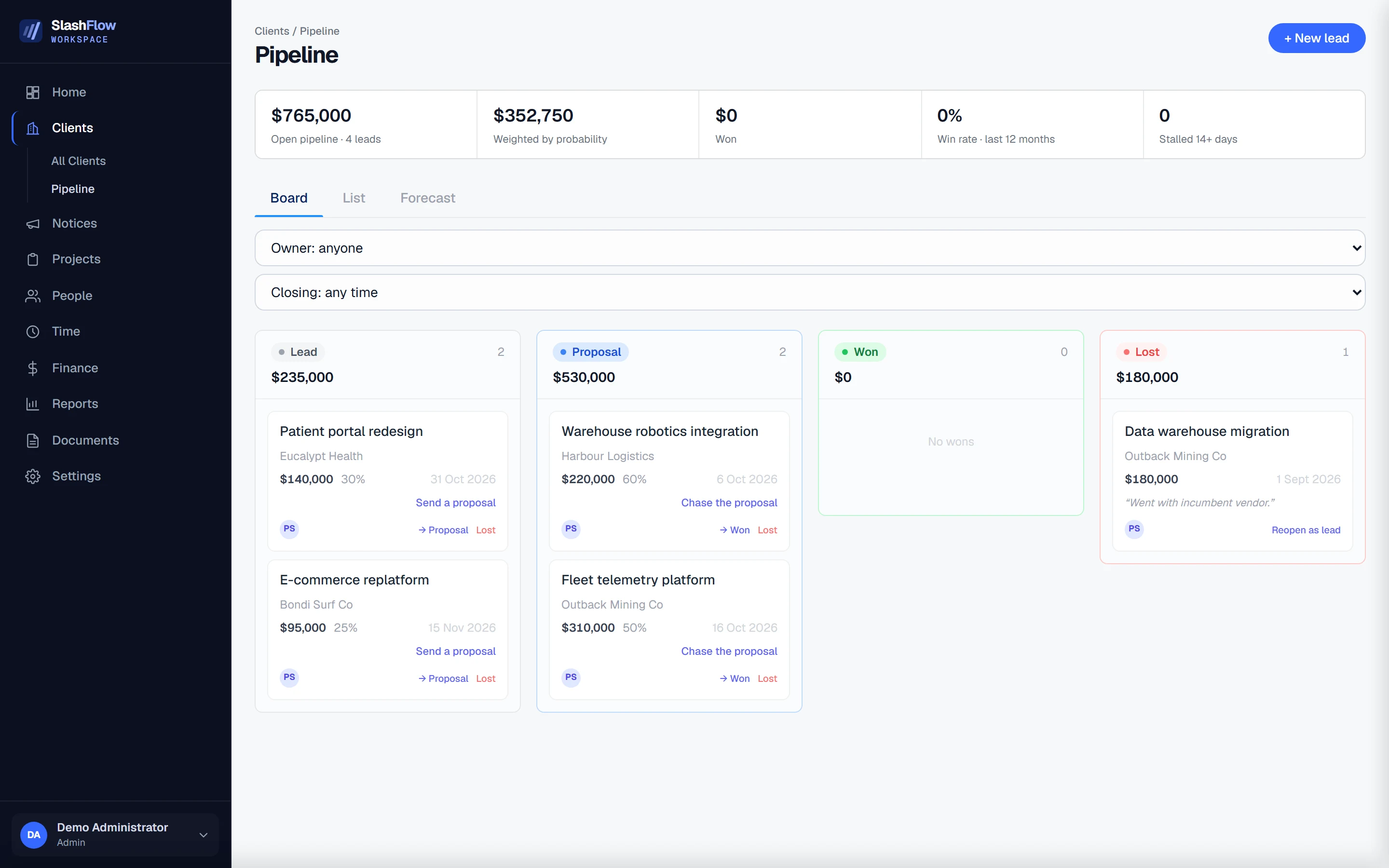
An opportunity with a next action on it
Every lead carries its value, its probability, its close date and the one thing that moves it forward. Nothing sits in the pipeline without somebody knowing what it is waiting for.
Open pipeline, weighted by probability
02
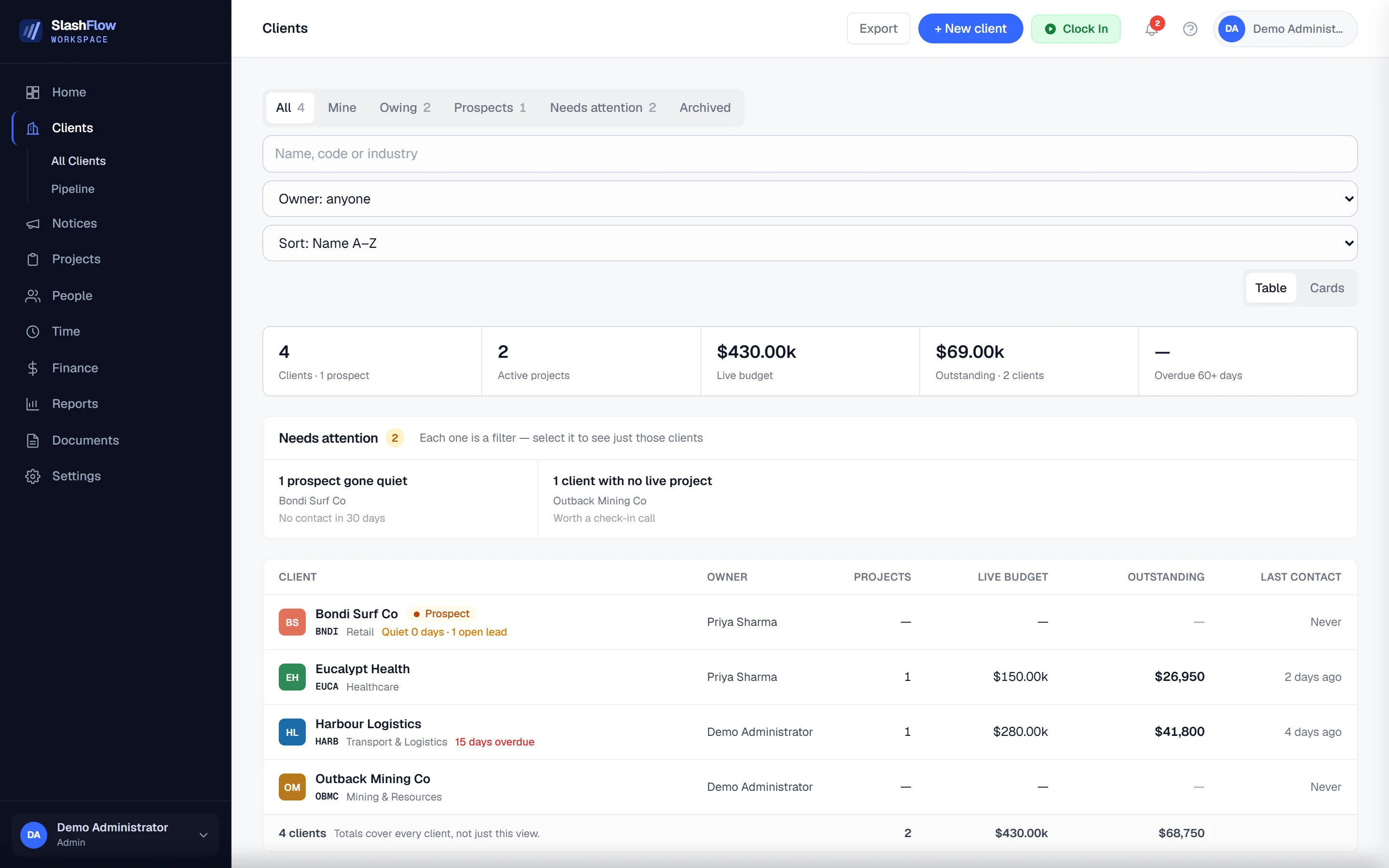
A client you can see the whole of
Won work becomes a project against a client record that already knows what it is worth, what is outstanding and when you last spoke. The ones going quiet surface themselves instead of being noticed late.
Needs attention — each one is a filter
03
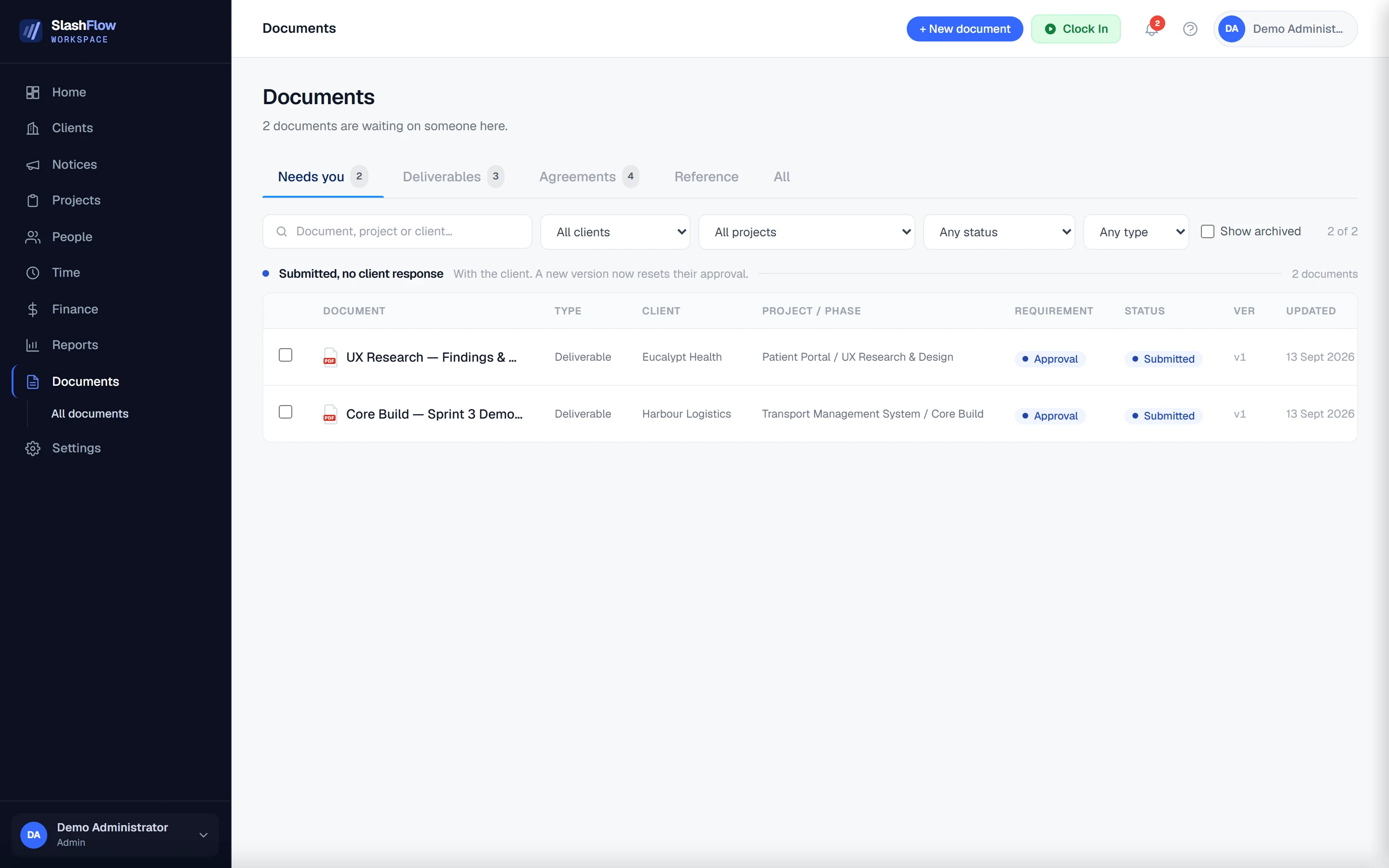
Approvals that stop going missing
Scopes, agreements and deliverables are sent for review or signature from the record they belong to. The list groups by who is actually holding each one up, so chasing is a decision rather than an archaeology exercise.
Grouped by who the work is sitting with
04
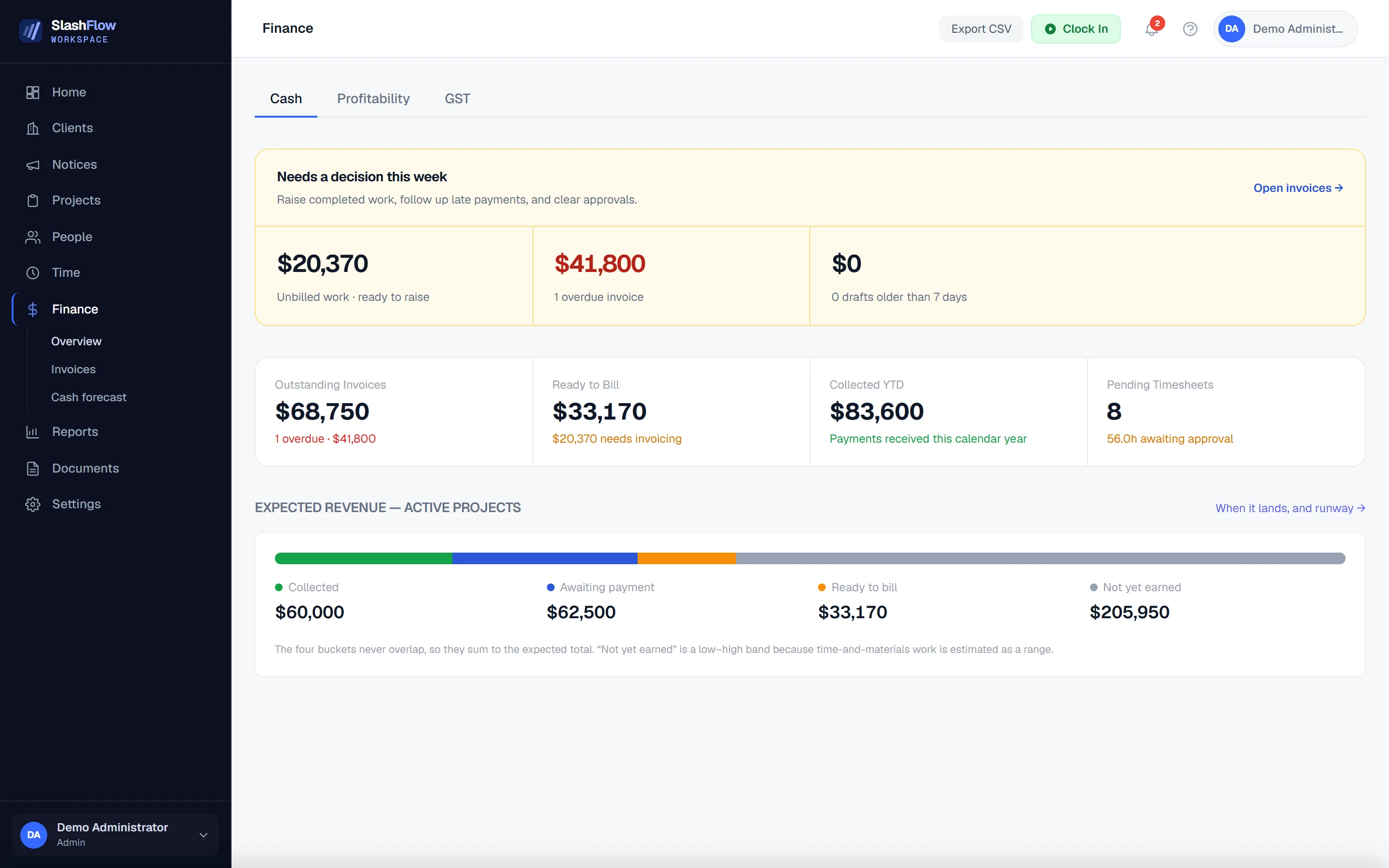
The money position, without a reconciliation
Delivered work that has not been billed is a number on the screen, not a discovery at month end. Collected, awaiting payment, ready to bill and not yet earned never overlap, so they add up to what you are actually owed.
Four buckets that never overlap


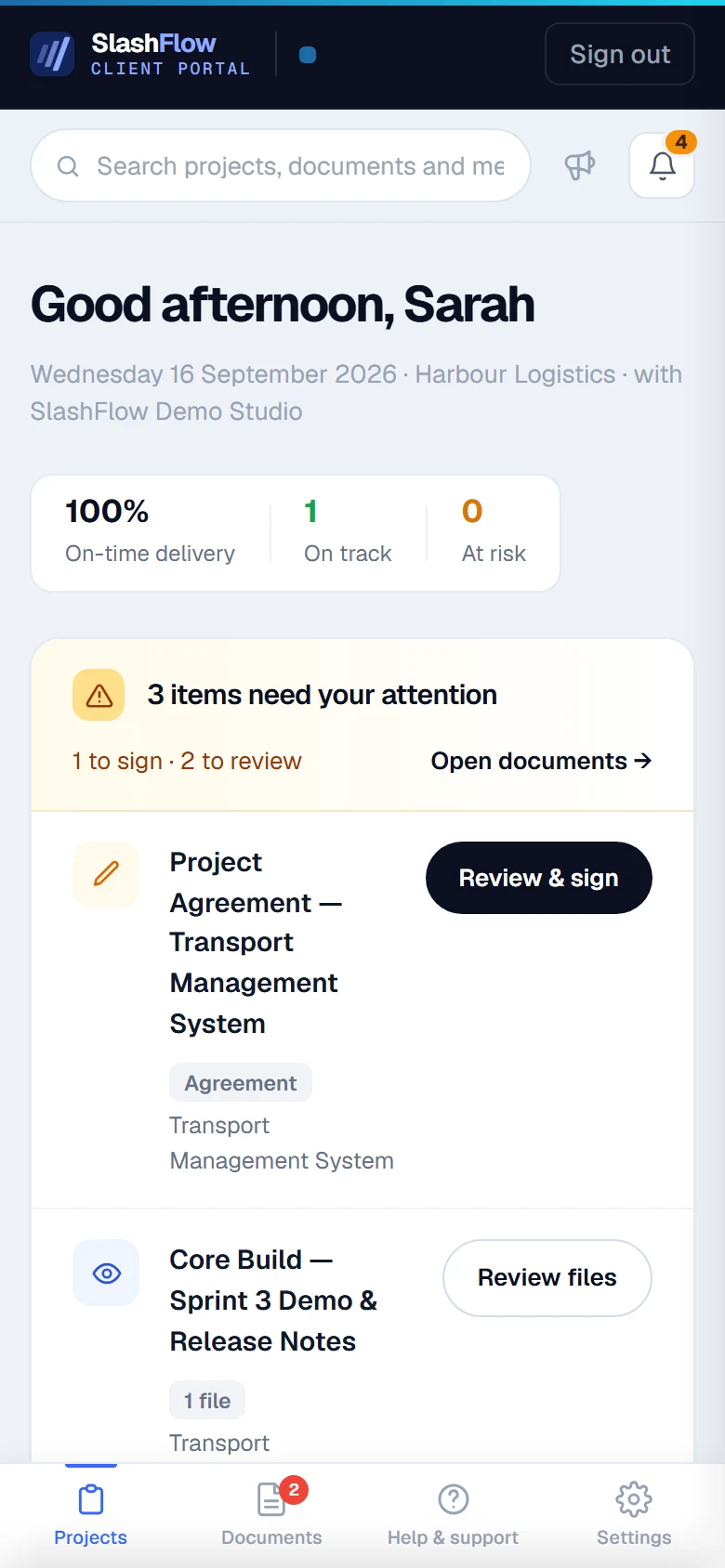
The client sees the same thing you do.
Not a status summary emailed after the fact — the record itself. When a deliverable is submitted or an agreement needs signing, it appears in their portal against the project it belongs to, and their decision lands back on the same document.
Their view · Harbour Logistics
What the beta includes.
- Everything that needs you, in one list
- Overdue work, approvals waiting, invoices past due and documents sitting with a client — on the home screen, not assembled on request.
- Documents that carry their own state
- Upload, send for review, collect signatures, approve, share. Agreements and deliverables know which project and phase they belong to, and who they are waiting on.
- A client portal they will actually open
- Your client signs in to the same record you are working from — what needs them, where their project is up to, what has been signed, and their billing.
- Time that reaches an invoice
- Sessions logged against a phase, approved through a timesheet, and carried into what is ready to bill — so delivered work stops ageing unbilled.
01
02
03
04
Not in the beta
These exist in the product and are not part of early access. We would rather say so here than have you find out after you have joined.
- Capacity and resource planning
- Client messaging
- Expenses
- Leave management
- Advanced insights
- Writing documents from templates
How it is built
Visibility,
without surveillance.
You can see where work is without watching how people work. Status belongs to the project, not to the person doing it.
Structure,
without bureaucracy.
Enough shape that nothing falls through, and not one field more than the work genuinely needs. Every form on a screen is one somebody has to fill in.
State,
not autopilot.
The system holds what is true and surfaces what is waiting. It does not convert your leads, raise your invoices or chase your clients — those stay with the people accountable for them.
Built inside a business. Not inside a pitch deck.
SlashFlow began as the system SlashTech built to run itself — because the problems were ours first.
Every part of it was written against real projects, real capacity constraints, real invoices and real clients. It exists because we needed it to work, not because it demonstrated well. It is now being developed for other teams as a Slash Group venture.
That is where it comes from, and it is the honest limit of what we can claim: running our own firm on it tells you the software runs a firm. Whether it suits yours is what the beta is for.
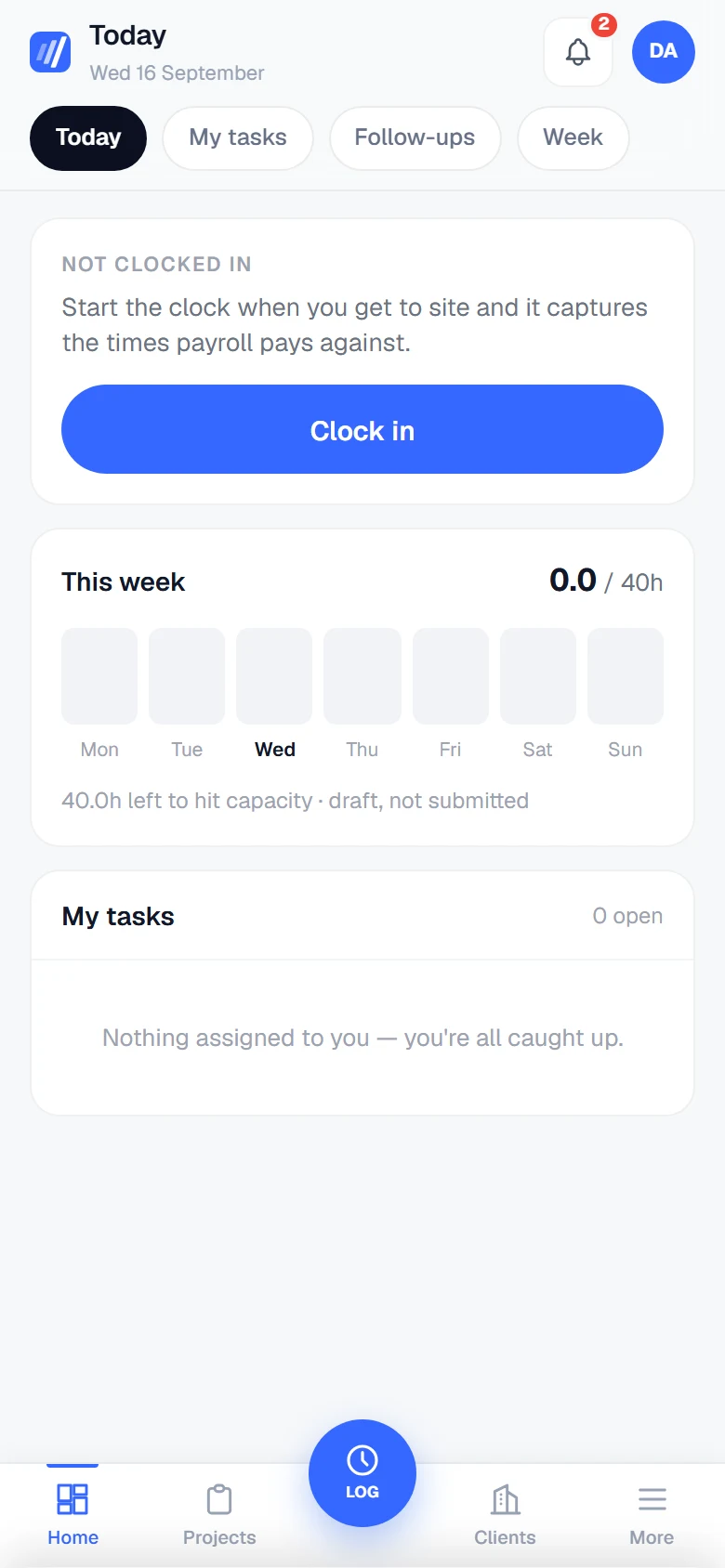
Slash GroupThe same workspace and the same portal on a phone — genuine responsive screens, not a desktop page scaled down.
What early access means.
SlashFlow is in private beta. The list is how we find out who it should be for, and in what order.
- Who it is for
- Professional-services teams that deliver client work in projects or phases — consultancies, agencies, engineering and specialist firms. It is designed around firms of roughly five to a hundred people.
- What joining gives you
- A place on the early-access list, and an email to this address when there is a place for your team. That is the whole of it.
- How invitations will work
- Access opens in stages rather than all at once. We have not set cohort sizes or dates, and we would rather tell you that than invent a timeline.
- What we will ask of you
- Nothing, unless you tick the box. If you do, we may ask what is working and what is not while you use it — early versions change, and feedback is what changes them.
Work should move.SlashFlow is coming.
Join the early access waitlist. We will email you when there is a place for your team.
Joining the list does not give you access to the application, and it is not a commitment on either side.
Before you join.
Something not answered here? Ask us directly — a person reads it.
support@slashflow.com.auDoes joining the waitlist give me access?
No. It records your interest and nothing more. Access to the beta opens in stages, and we will email the address you give us when there is a place for your team.
When does the beta open, and how many teams are you taking?
We have not decided, and we would rather say that than give you a date we invented. Access opens progressively rather than in one launch.
Is SlashFlow finished?
No — it is in private beta, which is why there is a waitlist rather than a sign-up button. The core is in daily use running our own firm: clients, pipeline, projects, time, documents, billing and the client portal. Several other modules exist in the product but sit outside early access.
Who is it for?
Professional-services teams that deliver client work in projects or phases — consultancies, agencies, engineering and specialist firms. It is designed around firms of roughly five to a hundred people. If you do not deliver client work against scopes and phases, it is probably not for you.
Will it replace the tools we already use?
Some of them, probably not all. SlashFlow connects the operational middle — the work, the people on it, the documents around it and what it is worth. It is not an accounting package and it does not try to be your inbox.
What does it cost?
Pricing is not set. Nothing on this page is an offer, and joining the list does not commit you to anything.
Are the screenshots on this page real?
Yes. Every one is a capture of the running application, taken by a script against a demonstration database. The firm, the clients, the projects and the people in them are fictional, and no real customer data appears anywhere on this site.
What will you do with what I send you?
Run the early-access list with it. It is not added to any other mailing list and it is not passed to anyone else. Ask us to remove it at any time at privacy@slashflow.com.au.